Passkeys and Phishing-Resistant MFA in 2026: A Practical Business Migration Guide
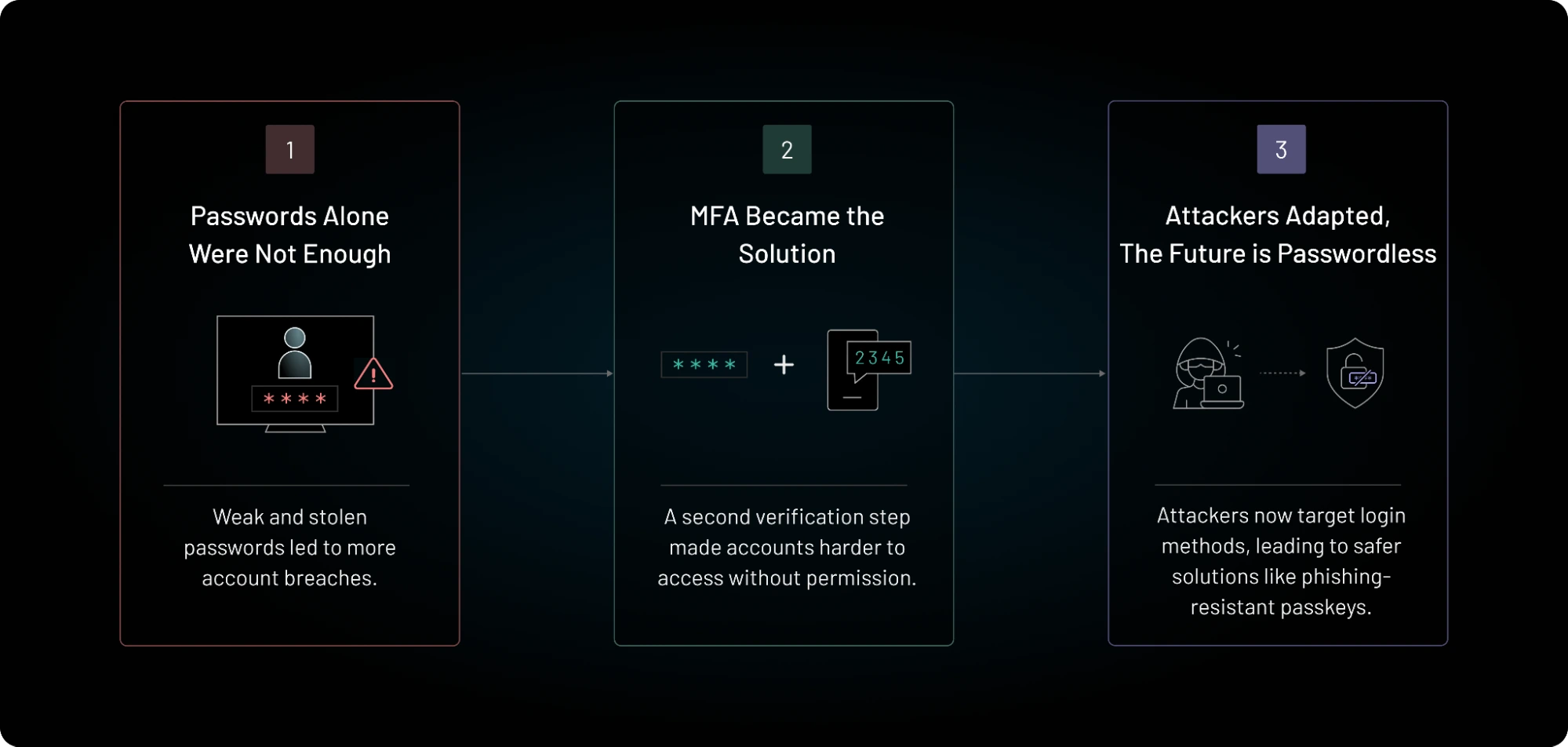
Passwords are still everywhere, but they are a weak foundation for business security. People reuse them. Attackers steal them. Fake login pages capture them. Even traditional multifactor authentication can fail when an employee is tricked into typing a one-time code into a phishing site.
That is why passkeys and phishing-resistant MFA have become a major identity security priority in 2026.
The change is already visible in large enterprise platforms. Microsoft announced that passkeys would become the default authentication experience in Microsoft Entra ID beginning September 1, 2026. Microsoft also plans to retire its own SMS and voice authentication delivery in Entra ID on February 1, 2027. CISA recommends that businesses aim for phishing-resistant MFA. NIST explains that cryptographic authentication methods such as WebAuthn can provide phishing resistance because authentication is bound to the legitimate site.
Moving to passkeys can improve security and reduce login friction, but a careless rollout can create lockouts and support problems. This guide explains how to migrate in a controlled way.
What Is Phishing-Resistant MFA?
Phishing-resistant authentication is designed so that a fake website cannot simply steal a password or code and reuse it on the real site.
Traditional one-time codes are better than passwords alone, but users can still type those codes into a fake login page. Push notifications can also be abused when attackers repeatedly send prompts until a user approves one.
FIDO2 and WebAuthn-based methods work differently. They use cryptographic keys and bind authentication to the correct service. The user does not send a reusable secret to the website.
Common phishing-resistant options
- Device-bound passkeys
- Syncable passkeys
- FIDO2 hardware security keys
- Windows Hello for Business
- Certificate-based authentication in suitable enterprise environments
The exact option depends on your identity provider, devices, risk level, and recovery needs.
What Is a Passkey?
A passkey is a cryptographic credential that can replace a password for supported services. The private key stays on a trusted authenticator or is securely synchronized through an approved platform. The service stores the public key.
During sign-in, the service sends a challenge. The authenticator signs it. The user normally proves presence or identity with a device PIN, fingerprint, face scan, or another local method.
Why the phishing protection matters
A passkey created for one legitimate domain is not meant to authenticate to a look-alike phishing domain. This removes one of the biggest weaknesses of passwords and typed one-time codes.
NIST’s digital identity guidance recognizes WebAuthn and FIDO2 as examples of phishing-resistant authentication based on verifier name binding.
Passkeys Do Not Eliminate Every Security Risk
Passkeys are strong, but they are not magic.
An attacker may still steal an active session. Malware may control a device after login. A help desk may be socially engineered into resetting an account. Weak account recovery can bypass strong authentication. An employee may approve a dangerous OAuth app after signing in correctly.
Passkeys should therefore sit inside a broader identity program that includes least privilege, device security, conditional access, logging, session controls, recovery protection, and user lifecycle management.
Start With an Authentication Inventory
Do not turn on a new method without knowing what users rely on today.
List every important login system
- Cloud office suite
- VPN or zero-trust access
- CRM
- Finance and payroll
- Cloud administration
- Developer tools
- Password manager
- Customer support systems
- Remote desktop tools
- Security consoles
- Domain registrar and DNS
For each system, record the identity provider, current MFA method, number of users, number of privileged users, passkey or FIDO support, recovery process, and business impact of lockout.
Protect Administrators First
Privileged accounts should be the first migration group because they can cause the most damage if compromised.
Microsoft recommends phishing-resistant MFA for privileged administrator roles. CISA guidance also places strong emphasis on administrator and high-value accounts.
High-priority users include
- Global or tenant administrators
- Cloud infrastructure administrators
- Security administrators
- Email administrators
- Finance approvers
- Domain and DNS administrators
- Backup administrators
- People with broad customer data access
- Developers who can deploy production code
Do not wait for the full workforce rollout before protecting these accounts.
Choose Between Syncable Passkeys and Hardware Security Keys
Both can provide strong protection, but they solve different problems.
Syncable passkeys
Syncable passkeys are convenient for ordinary users. They can work across supported devices through an approved credential ecosystem. They reduce the chance that losing one phone permanently locks a user out.
They work well for many standard employee accounts, especially when the organization already manages the device and identity environment.
Hardware security keys
Physical FIDO security keys provide a clear, separate authenticator. They can be useful for administrators, high-risk users, shared work environments, and accounts where the organization wants tighter control over credential storage.
CISA has described hardware-based FIDO security keys as a particularly strong option and passkeys as an acceptable phishing-resistant alternative in suitable cases.
Use risk tiers
You do not need one method for everyone. A practical policy might use managed passkeys for standard employees, hardware security keys for privileged administrators, and additional controls for emergency accounts.
Plan Recovery Before Deployment
Recovery is one of the most important parts of passkey security.
If a user loses a device, changes phones, forgets a local PIN, or leaves the company, the business needs a secure process. If recovery is weak, attackers will target it instead of the passkey.
Create at least two safe recovery paths
Examples include a second registered authenticator, an approved backup hardware key, a managed device enrollment process, or a help-desk recovery flow with strong identity checks.
Avoid making SMS the universal fallback for high-value accounts. If an attacker can bypass the passkey with a text message, the security gain is much smaller.
Test real failure cases
Before launch, test a lost phone, broken laptop, lost security key, employee traveling without a backup device, terminated employee, and unavailable identity administrator.
Keep Emergency Access Accounts Separate
Most cloud identity systems need a small number of emergency or break-glass accounts. These accounts should not become everyday shortcuts.
Store their credentials securely. Protect them with strong authentication supported by the platform. Alert on every use. Test access on a schedule. Review who can retrieve the recovery material.
The goal is business continuity without creating a permanent bypass around strong identity controls.
Run a Pilot With Real Users
A pilot is not only a technical test. It shows whether employees understand the experience.
Choose a mixed pilot group
Include IT staff, nontechnical employees, remote workers, mobile users, executives, and at least one team with shared or unusual workflows.
A pilot of 20 to 50 users is often large enough to expose practical problems without putting the whole business at risk.
Measure more than login success
- Enrollment completion rate
- Time to enroll
- Login success rate
- Help-desk tickets
- Recovery events
- User satisfaction
- Failed phishing simulations
- Use of weaker fallback methods
Remove Weak Fallbacks Carefully
Adding passkeys while leaving password-only, SMS, email codes, and weak recovery options available may leave attackers with an easier path.
Do not remove every fallback on day one. First confirm that users have a reliable strong method and recovery path. Then reduce weaker methods by risk group.
A staged approach
Stage one: enable passkeys and encourage registration.
Stage two: require phishing-resistant authentication for administrators and high-risk apps.
Stage three: expand the requirement to the broader workforce.
Stage four: disable weak methods where business and platform support allow it.
Stage five: monitor exceptions and eliminate permanent bypasses.
Microsoft Entra ID Changes Make 2026 a Useful Migration Point
Microsoft’s 2026 changes give many organizations a clear reason to review their authentication strategy now.
Microsoft says users enabled for SMS or voice in Entra ID will be prompted toward passkey registration as the new default experience. Its published timeline also states that Microsoft-provided SMS and voice delivery is scheduled for retirement on February 1, 2027.
That does not mean every organization must remove every phone-based method immediately. It does mean teams that depend on older methods should understand the new behavior, confirm licensing and regional details, and build a migration plan before the deadline creates pressure.
Use Conditional Access Instead of One Rule for Every Situation
Risk changes by user, device, application, and location.
A company may allow a managed employee to use a passkey for normal work but require a hardware-backed method for privileged administration. It may block legacy authentication entirely. It may require a compliant device for sensitive applications.
Useful policy signals include
- User role
- Device compliance
- Application sensitivity
- Sign-in risk
- Location
- Network trust
- Session age
- Authentication strength
Keep policies understandable. A complex set of overlapping rules can cause lockouts and make incident response harder.
Do Not Forget Service Accounts and Legacy Systems
Human passkeys do not solve machine identity.
Older applications may still use passwords, shared credentials, API keys, or basic authentication. Inventory those systems separately.
Move workloads toward managed identities, workload identity federation, certificates, or short-lived tokens when possible. Remove credentials from scripts and configuration files.
For systems that cannot support modern authentication, isolate them, limit network access, monitor them closely, and create a replacement plan.
Train Employees on the New Mental Model
Passkeys are easier when users understand why they are different.
A short training message can explain:
- You may no longer type a password for some services.
- Your device verifies you with a local PIN or biometric.
- A legitimate passkey prompt should be tied to the real service.
- Never approve unexpected account recovery requests.
- Report lost devices quickly.
- Do not create unapproved personal passkeys for work accounts if company policy forbids it.
Keep the message simple. Users do not need a cryptography lecture.
Build a Secure Help-Desk Recovery Process
Attackers know that strong MFA is hard to beat. They may call the help desk instead.
Help-desk staff should not rely on easy personal questions
A name, birthday, manager name, or employee number may be public or easy to discover.
Use stronger verification such as manager approval through a known channel, managed device checks, identity proofing steps, or a defined high-risk recovery process.
Require a second person for sensitive administrator recovery. Log every reset. Alert the security team when privileged authentication is replaced.
Monitor Authentication After Rollout
Migration is not finished when enrollment reaches 100 percent.
Monitor failed sign-ins, fallback use, new credential registration, recovery events, unusual device changes, impossible travel, risky sessions, and administrator authenticator changes.
Create useful alerts
An alert should help someone act. Examples include:
- New passkey registered for a privileged account
- Emergency account used
- Weak MFA used on a sensitive application
- Many failed recovery attempts
- Authentication method changed after a risky sign-in
- Legacy authentication attempt
Practical 90-Day Migration Plan
Days 1–15: Inventory
List critical applications, identity providers, user groups, current MFA methods, privileged accounts, and recovery processes. Identify systems that support FIDO2 or passkeys.
Days 16–30: Policy and recovery
Choose approved authenticator types. Define admin requirements. Build recovery procedures. Order hardware keys if needed. Create user guidance.
Days 31–45: Admin rollout
Enroll privileged users. Test emergency accounts. Require phishing-resistant methods on the most sensitive admin portals.
Days 46–60: Pilot
Enroll a mixed employee group. Measure support cases, failures, and user feedback. Fix device and recovery problems.
Days 61–75: Workforce rollout
Roll out by department. Track enrollment daily. Give employees a clear deadline and self-service instructions.
Days 76–90: Reduce weak methods
Disable weaker methods where safe. Document exceptions. Add monitoring. Schedule a review for remaining legacy systems.
Common Migration Mistakes
Turning off old methods too early. Users need a working strong method and recovery path first.
Keeping SMS as an easy bypass forever. Temporary fallbacks often become permanent unless someone owns removal.
Ignoring administrators. Privileged users should be first, not last.
Using weak help-desk recovery. Attackers will target the easiest reset path.
Forgetting contractors and shared devices. Their workflows may differ from standard employees.
Assuming passkeys secure active sessions. Session theft and device compromise still need controls.
Business Passkey Checklist
- Inventory critical accounts and applications.
- Identify every privileged user.
- Choose approved passkey and security-key options.
- Protect administrators first.
- Plan at least two safe recovery paths.
- Test lost-device scenarios.
- Use conditional access for sensitive apps.
- Reduce SMS and typed-code dependence.
- Strengthen help-desk identity verification.
- Monitor authenticator changes.
- Address legacy and service accounts separately.
- Train users with short, clear instructions.
- Review exceptions every month until they are closed.
Conclusion
Passkeys and phishing-resistant MFA are becoming practical business controls, not future concepts. In 2026, major identity platforms are making the shift more visible, and public security guidance continues to push organizations toward FIDO and other cryptographic methods.
The safest migration is staged. Start with an inventory. Protect administrators. Build recovery before enforcement. Run a pilot. Expand by department. Then remove weak fallback methods once users have reliable alternatives.
The goal is not to deploy a fashionable login method. The goal is to make stolen passwords and phishing pages far less useful to attackers while making secure sign-in easier for employees. A well-planned passkey rollout can improve both security and user experience at the same time.
Official Resources
For current guidance, review Microsoft’s 2026 Entra passkey update, Microsoft’s SMS and voice retirement timeline, CISA’s MFA guidance for businesses, and NIST Digital Identity Guidelines.
Leave a Reply